Authored by Ariel Fernandez (Senior Factory-Trained Fuji Frontier & Noritsu QSS Engineer, AVA-Tech) • Peer-Reviewed by AVA-Tech Bench Engineering Team (4700 N 5th Street Hwy, Temple, PA 19560).
E-2611, W-2602, E-2624
Deep-dive maintenance protocol for P1, P2, and PS1–PS4 processing racks, drive gears, and crossover squeegees on Fuji Frontier LP7000-series wet minilabs.
1. Commercial Photo Lab Field Case Study (Fuji Frontier LP7500 / LP7700 / LP7900)
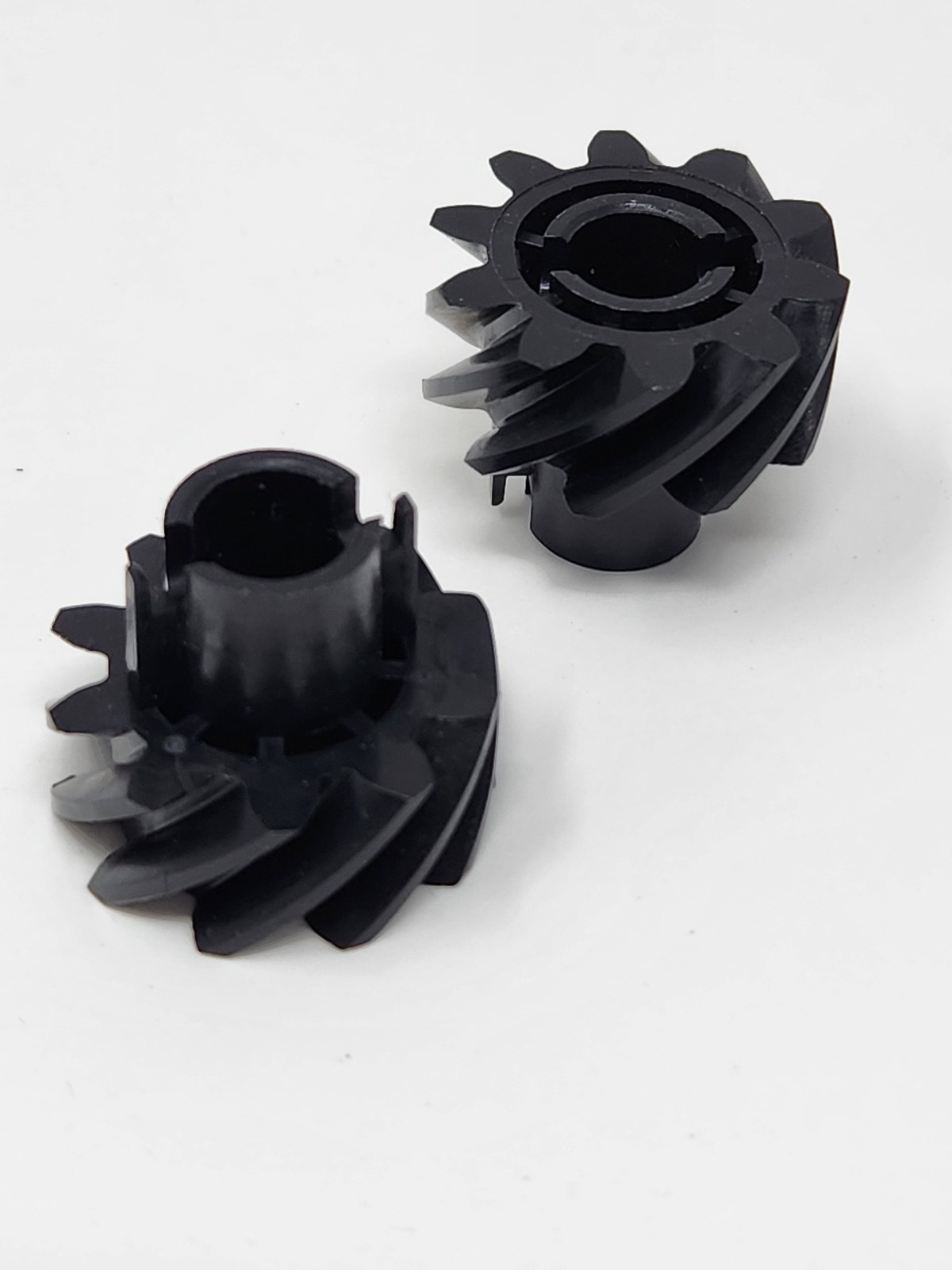
A national sports photography lab running four Fuji Frontier LP7700 printers suffered repeated E-2611 processor paper jams in the PS2-to-PS3 crossover and yellow stain streaks on 8×10 lustre prints. Pulling the P1, P2, and PS racks revealed tarred CP-49E developer deposits on the P1 turnaround guide shoes and worn D-cut drive gears (327D1060170B / 327D1060172) allowing roller slip. AVA-Tech performed a complete on-site rack overhaul—replacing all worn gears, bearings, tension springs, and crossover squeegee rollers—cutting paper waste to zero.
In commercial wet-lab and film processing environments, seemingly minor drift in optical modulation, replenishment volume, temperature control, or roller nip geometry rapidly compounds across hundreds of rolls and thousands of RA-4 prints. At AVA-Tech in Temple, Pennsylvania, our factory-trained engineers diagnose these root causes daily using OEM service software, calibrated sensitometry, and component-level circuit diagnostics rather than guesswork.
2. OEM Engineering Specifications & Diagnostic Thresholds
Before replacing sub-assemblies or adjusting lookup tables on Fuji Frontier LP7500 / LP7700 / LP7900, verify all parameters against the following factory engineering tolerances:
| Subsystem / Parameter | Factory Engineering Specification & Tolerance |
|---|---|
| P1 Developer Temperature | 38.5°C ± 0.2°C (CP-49E / Ecopro RA-4 Rapid Chemistry) |
| P2 Bleach-Fix Temperature | 38.0°C ± 0.5°C |
| PS1–PS4 Super Rinse Temp | 35.0°C–38.0°C cascaded counter-current flow |
| Crossover Squeegee Gap | Zero light gap with uniform nip pressure across 12-inch width |
3. Step-by-Step Factory Diagnostic & Calibration Procedure
Follow this field-validated sequence to isolate and resolve the issue safely:
- Step 1: Remove all crossover assemblies daily at shutdown, rinse thoroughly in warm water (never above 45°C), and wipe EPDM squeegee rollers dry.
- Step 2: Monthly, pull P1, P2, and PS1–PS4 racks into a wash sink; inspect every gear (327D1060170B / 327D1060172) and plastic bearing bush for play or tooth wear.
- Step 3: Clean P1 developer rack rollers with mild non-abrasive pad to remove oxidized developer tar without scoring the roller surface.
- Step 4: Verify circulation filter cartridge differential pressure and replace P1/P2 chemical filters every 30 days or 25,000 prints.
Need Immediate Remote Diagnostics, Loaner PCBs, or OEM Parts?
AVA-Tech stocks 226+ core indexed Fuji Frontier and Noritsu QSS assemblies (plus thousands of component SKUs) in our Temple, PA warehouse. Unsure of a part number? Upload a photo to our free AI Parts Identifier, browse the OEM Parts Catalog, or enroll in an Enhanced Support Plan for live remote sessions and loaner PCB privileges.
4. Frequently Asked Questions (Technician & Lab Manager FAQ)
What causes yellow or magenta stains along the leading edge of prints on a Fuji LP7700?
Worn P1-to-P2 crossover squeegee rollers allow alkaline P1 developer carry-over into the acidic P2 bleach-fix tank, causing chemical fogging and rapid bleach-fix exhaustion.
Why do paper jams happen most often in the PS3/PS4 racks or dryer entrance?
Biological algae growth in under-replenished PS rinse tanks makes rollers slick while swelling rack bushings, causing leading-edge skew into the dryer entrance.
Does AVA-Tech offer complete rack refurbishment for Fuji LP7500/7700/7900?
Yes—AVA-Tech strips, ultrasonically cleans, and rebuilds Fuji Frontier and Noritsu processing racks with genuine OEM gears, rollers, shafts, and springs.
5. Related Topical Cluster Guides in Fuji Frontier Systems
- Calibrating Multi-Magazine Switching Decks on Fuji Frontier LP5700R & LP7700: Eliminating Magazine Selection Jams (Fuji Frontier Systems • 2026-06-03)
- Cleanroom Optical Maintenance for Wet Minilabs: Safely Cleaning Dichroic Mirrors, Cylindrical Lenses & Dust Windows (Fuji Frontier Systems • 2026-05-15)
- Fuji Frontier LP5000 / LP5500 / LP5700 Dryer Section Overhaul: Solving Print Curl, Roller Marks & Heater Error E-2630 (Fuji Frontier Systems • 2026-09-01)
About the Author & AVA-Tech Engineering Team (E-E-A-T)
Ariel Fernandez is Lead Factory-Trained Systems Engineer at AVA-Tech in Temple, Pennsylvania. With decades of hands-on field and bench experience servicing Fuji Frontier wet/dry minilabs, Noritsu QSS systems, C-41/E-6 film processors, and SP-3000/HS-1800 film scanners, AVA-Tech supports commercial, school, wedding, and independent film labs across all 50 states.
More Guides in Fuji Frontier Systems
Fuji Frontier 570 / LP5700R Error E-2529 & E-2510: LDD20 PCB & G/B SHG Laser Optical Section Diagnostics
Complete engineering guide to isolating LDD20 Laser Diode Driver PCB faults from Second Harmonic Generation (SHG) laser module degradation on Fuji Frontier 550/570 and LP5700R wet minilabs.
Fuji Frontier LP5000 / LP5500 / LP5700 Dryer Section Overhaul: Solving Print Curl, Roller Marks & Heater Error E-2630
How to cure dryer entrance jams, emulsion glaze marks, and E-2630 dryer heater circuit cutouts on Fuji Frontier wet minilabs.
Upgrading Fuji Frontier SP-3000, LP5700 & LP7700 Lab Workstations to Windows 10 / 11 with MS01 Software
Modernizing legacy Windows 2000/XP Fuji Frontier DIC/FMPC control computers to reliable Windows 10/11 Pro hardware running Fujifilm MS01.